iPhone / export guide
How to export a WhatsApp chat to PDF on iPhone
First save the conversation from WhatsApp, then turn that export into a readable PDF in your browser. The export is your source; the PDF is a copy for reading.
Reviewed · Threadkeep
Step by step
Open the conversation in WhatsApp
On your iPhone, open the individual or group chat you want to preserve. Tap its name to open the information screen and find Export Chat. Follow the current labels if your app displays a different menu.
Choose whether to include media
Choose the media option for a copy that can contain photos. Choose the text-only option if message text is enough. Including media does not guarantee every historical attachment will be available.
Save the exported files
In the iOS share sheet, use Save to Files if available. Keep the text or ZIP and any accompanying attachments together. Save an untouched copy before you extract, rename or reorganize anything.
Choose the export in Threadkeep
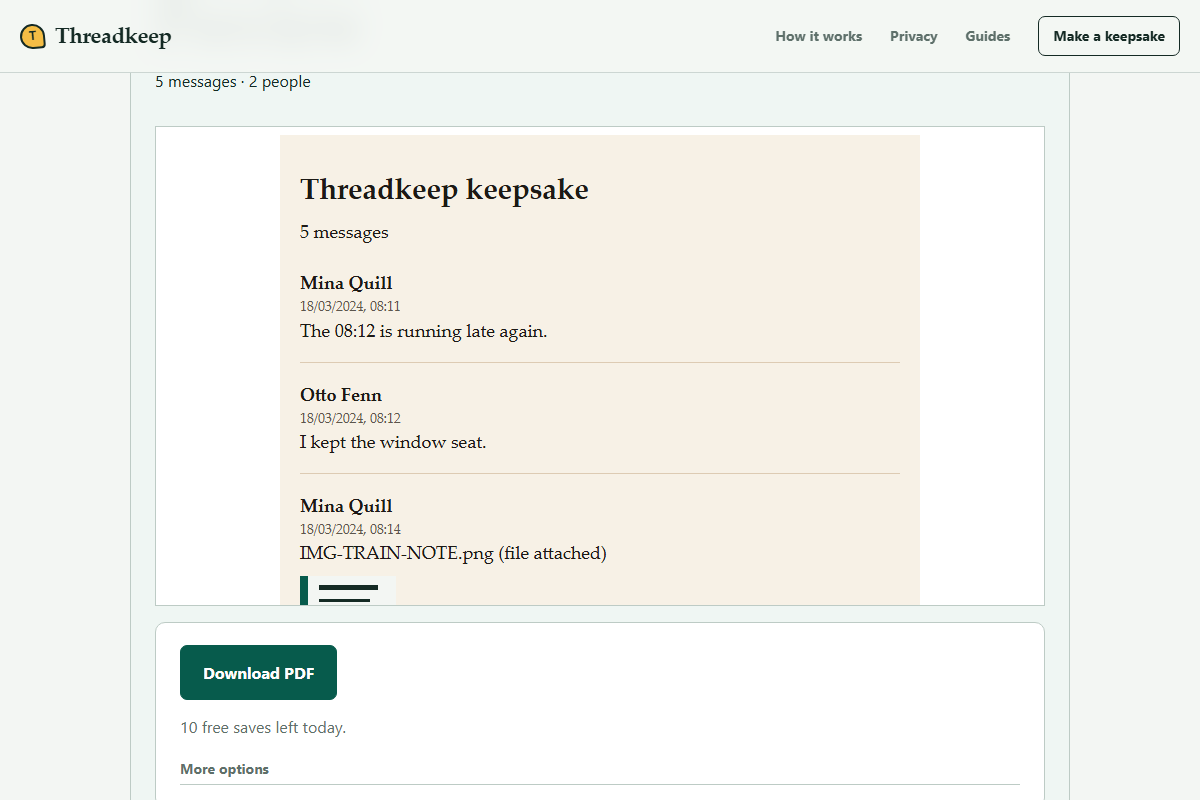
Open Make a keepsake in Safari or another supported browser. Select the exported .txt or .zip file in Files. Preview the messages and check the warning about any photo that could not be matched.
Download and open the PDF
Use Download PDF, then open the saved document in Files or a PDF reader. Search for a distinctive message and inspect dates and photos. Keep the original export even when the PDF looks correct.
Before choosing a file
Confirm that you are exporting the intended chat rather than screenshots, an account-data report or a phone backup. Those files serve different purposes. Threadkeep accepts a plain-text transcript or a supported ZIP export. If Files shows a cloud placeholder, let it download completely before you choose it in the browser.
Keep a clear distinction between the source and the finished document. The source contains whatever WhatsApp included at export time. The PDF contains the messages selected in the preview and the photos the exporter can handle. Neither a successful download nor a familiar first page proves that the whole conversation survived.
Check the conversation, not just the first page
Compare the oldest and newest dates in the transcript with the history you expected to save. Look for an early message, a recent message and a message near an important photo. A date-range or participant filter changes the readable copy, so review those choices before downloading.
If the source itself ends early, trying another PDF layout cannot bring the missing messages back. Keep the file, check WhatsApp's current export guidance and compare another export while the conversation is still accessible. Avoid deleting messages as a troubleshooting shortcut.
If photos are absent
Open a copy of the export and check whether it actually contains image files. A transcript can mention an attachment even when that attachment was not included. Renaming a photo can also break the association with its message. Preserve the names in the original archive.
Threadkeep reports unmatched media. Unsupported audio, video, documents or images should remain in your original source archive; a readable PDF is not a container for every file type. For a larger export, inspect the size and media limits before retrying.
Keep the finished copy private
The conversion runs on your device, but a downloaded PDF is an ordinary file. Check whether your Files destination automatically syncs to iCloud or another service. Store a private copy in a location appropriate for the conversation and consider other participants before sending it onward.
If the phone struggles while generating the PDF, close other heavy tabs or transfer an unchanged source copy to a device with more memory. Opening the same public page does not transfer the chat automatically; you choose the source on each device.
Questions
Can I turn an iCloud WhatsApp backup into this PDF?
Threadkeep reads a chat export, not an iCloud backup. Use WhatsApp's export action for a conversation you can open. A PDF cannot be imported back into WhatsApp as a restore file.
What if Save to Files is not offered?
Use a sharing destination available on your phone and verify that it saves the source file and attachments. Sharing through email or a cloud drive has its own privacy implications; local conversion does not undo that transfer.